Posts

Don't bother asking Blizzard for support

 I think these guys have even worse customer care than Telkom. I have never encountered this level of uselessness. The summary is basically "go to the forums". No matter what I report, no matter how detailed my bug report (yes, bugs, crashes etc), they just say go to the forums. So incredibly useless. This level of useless should come with a financial penalty for solutions not delivered but paid for. Is anyone up for a class action lawsuit? Dear John, Issue ID: #100848608 A Game Master resolved your ticket, and left the following response: Greetings, Thank you so much for reaching out, and for taking the time to go through the troubleshooting steps we provided. I’m really sorry to hear that those didn’t resolve the issue. I completely understand how frustrating it can be to try different solutions and still not find a fix. At this point, since we’ve explored all the standard support options available, the next best step would be to connect with others who might have encounter...

Can send GSM/SMS but can't receive on MTN

Image
 So this is a post about a weird symptom when you get a new simcard from MTN. I have also seen it on CellC. Basically: - internet works (TCP/IP) - GSM call outbound works - GSM SMS outbound works inbound GSM does NOT work Meaning you can't get OTP / 2FA SMS messages e.g. from Whatsapp etc. Nuisance! Ensure mobile data and signal are active (LTE/5G, not Airplane Mode). Check if you can send a normal SMS to a friend. If yes, issue is inbound only. Disable iMessage and FaceTime (Settings → Messages / FaceTime → Off). Restart the phone after disabling those. Check SMSC settings Dial *#5005*7672# (note: might fail on newer phones). Manually check for network mode switch Settings → Mobile Data → Voice & Data → only LTE/5G may be available on MTN. Try Manual Network Selection Settings → Mobile Data → Network Selection → Turn off Auto and test available networks. Check for call barring Dial *#33# → Ensure all barring says "Disabled...

corrupted usb disk? linux can fix

Recovering Data from a Corrupted Flash Disk on Linux 🔧 Step 1: Install the Recovery Tools Install GNU ddrescue and testdisk (which includes photorec): sudo apt-get install gddrescue testdisk 💽 Step 2: Make a Full Disk Image with ddrescue Do NOT work on the damaged flash drive directly. Instead, make a safe copy: sudo ddrescue -n /dev/sdX rescued.img rescued.log Replace /dev/sdX with your actual USB device (e.g. /dev/sdb). Use lsblk to check. This may take a while — especially if the disk has errors. 🧠 Step 3: Mount the Image (If Possible) Try mounting the recovered image: mkdir /mnt/recovered sudo mount -o loop rescued.img /mnt/recovered If that fails with a superblock error, try: sudo mount -t vfat -o loop rescued.img /mnt/recovered Still not working? The partition table might be corrupted. 🔍 Step 4: Inspect the Partition Table Run: fdisk -l rescued.img If you see absurd sizes (e.g. hundreds of GB on an 8GB drive), your partition table is toast. 🧰 Step 5: Recover Files with photo...

Adding your email service to Gmail under Google's professional suite (Workplace)

To set up gmail on workspace: Instructions: https://apps.google.com/supportwidget/articlehome?hl=en&article_url=https%3A%2F%2Fsupport.google.com%2Fa%2Fanswer%2F140038%3Fhl%3Den&assistant_id=generic-unu&product_context=140038&product_name=UnuFlow&trigger_context=a Tool: https://admin.google.com/u/3/ac/signup/setup/v2/verify/mx and test it here: https://toolbox.googleapps. com/apps/checkmx/ These links are really hard to find hence I am bookmarking them for everyone. This is for the  Google  Workspace  Error Message: "You do not have access to Email" 

Boot MacOS under VirtualBox

Introduction The following steps are needed to boot Mac OS under VirtualBox. I tested it using Mac OS X 10.13. I can't guarantee this works. You'll need a source/original mac to copy the OS install. Probably Apple won't approve of this because they want you to buy their original hardware, but sometimes you need hosted VMs in the cloud or similar, and they don't really offer that. Steps Commands below are typed in a command line like the Terminal. 1. On a Mac, do this to download an installer disk: softwareupdate --fetch-full-installer --full-installer-version  ... OR download from the app store. If the operating system you want to install is out of date, ie if the Mac tells you the installer is damaged, set your Mac date and time to however many years ago that operating system came out, and turn of automatic date and time in the date and time system preferences. That way the signature of the installer disk / bundle will still be valid (it is invalid if it is older than ...

Spotting a phishing (hacker) email

Image
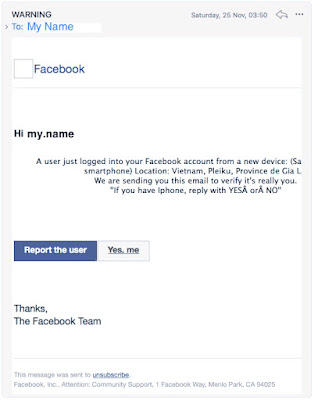
  How to spot a phishing email A phishing email is an email which looks legitimate but which tricks you into clicking a dangerous link or giving over your credentials to login to other systems like social media or banks. Many people receive phishing emails. They are sometimes convincing.  General properties They look convincing You feel a sense of urgency to deal with the email due to the implied problem They do not actually come from the system in question even though they say they do  Their email layout looks like the normal system email layout that you might get from the true system (e.g. your bank or facebook or whatever), but there are telltale signs that it is not from that system. They might have attachments, e.g. a fake bank statement, or fake password reset. In this post I will show you a few mails, starting with a fake Facebook password reset email. If we look at the above, we will see how to (A) detect that it is not actually from the real system, and (B) how t...

Windows updates and wipes your linux bootloader

 If windows updated and wiped your linux bootloader, follow these steps.  https://techblog.dev/posts/2021/12/how-to-fix-missing-grub-boot-menu-after-a-windows-update/  

Building an OR gate

Image
In this post we see how to build a logic OR gate. It's actually really simple to understand. Let's take a case where you want your car windows to wind up automatically, if either the engine is stopped OR the door is open (realistically you might not want that, but this is just a thought experiment). We are looking at two states: engine running (true/false) and door open (true/false). Using "1" for "true" and "0" for false, we want the window to wind up if either or both are true. So this is the truth table (v = OR): Engine on v Door closed = wind up Engine off v Door open = wind up Engine off v Door open = do not wind up Engine on v Door open = wind up 1 v 0 = 1 0 v 1 = 1 0 v 0 = 0 1 v 1 = 1 This also corresponds directly to English. "If my car door is open OR the engine is running, wind up the window, otherwise do not." Here's the actual circuit and a video.  

Building an AND-gate (logic flow/logic gate)

Image
 In this post we see how to build a logic AND gate. It's actually really simple to understand. Say you have a car door and a car ignition. On the car door you have a magnetic switch that lets a wire spring back to closed mode when the door is open. Ignition has electricity through it when the engine is on. SO you have live current in both scenarios, right? Call that state 1 and 1 Now consider a state where either the ignition is off AND the door is open, OR the door is closed AND the ignition is off. Call that state 0 and 1 or 1 and 0 (1=open/on, 0 = closed/off). Now suppose you want the interior head light in the car to turn on when the door is open and the ignition is on. You put a lightbulb on a wire. Then leading to that set of wiring you have this thing I made = an "and gate". You have electricity from the door and engine going there. The and gate does this: engine on , door open = 1 and 1 = true. Electricity must go to the light above your head. engine off, door ope...

Install Cygwin on Windows

Cygwin is a Linux command line emulator. https://cygwin.com/install.html Once it is installed, you will need to manually install other packages to let you build the software. Take the warning seriously: do not install everything, you will download hundreds of gigs of software you do not need. Rather install the specific dependencies. Once cygwin is installed, it will not, by default, set your home directory (home folder) to c:\users\yourname However, generally you DO want to do that, so you can use linux commands on your own files. To set that, follow the steps here: https://stackoverflow.com/questions/1494658/how-can-i-change-my-cygwin-home-folder-after-installation The packages I strongly recommend you install are rsync, ssh, openssh, curl  and wget Starting with Cygwin 1.7.34 , the recommended way to do this is to add a custom  db_home  setting to  /etc/nsswitch.conf . A common wish when doing this is to make your Cygwin home directory equal to your Windows user p...

Fake flash disks

Believe it or not, you get fake flash disks. What these do is they misreport their capacity. So, they might say they are 500 GB in size but actually they're only 14 GB, and really they're 16 GB drives that failed quality control. Wish.com is particularly bad in this regard; literally every single drive I've bought from there has been fake flash. To test a drive to see if it is fake or lying about its size, try use f3 (fight flash fraud). https://fight-flash-fraud.readthedocs.io/en/stable/ It's a commandline utility available for mac and linux that lets you test a drive and program it to "learn" its actual/true usable size. It does this by testing every block, and when it starts getting write failures (or read verification failures), it marks that as the actual end of the disk. I've found that regardless of what size a fake flash disk says it is, it is usually 12-14 GB in size, never what it actually says. As the story goes, if it seems to good to be true, ...

Useful windows software

 This page will list useful windows software. I will update it periodically. The items listed below are in no particular order of preference. They are identified as item title / purpose. Abex PowerPoint to Word - converts PPTX to DOCX APFS for Windows by Paragon Software - lets you read apple APFS drives Paragon hfs+ for windows - lets you read apple HFS+ drives Affinity Designer - alternative to Adobe Illustrator Affinity Photo and Gimp - alternatives to Adobe Photoshop (Gimp is free) Cygwin - a mini linux command line for windows. I will post a separate post about how to make it default to your home directory (c:\users\myname\) because it doesn't default there. Deltacopy - rsync, to copy differences between two folders Greenshot - more flexible screenshots, lets you automatically save-as iCloud - to link your PC to iCloud Inkscape - free alternative to Adobe Illustrator Notepad++ - a good text editor PdfTk - to manipulate PDFs SmarTTY - a good SSH client Telegram and Whatsapp des...

powershell commands for bitlocker to unlock drives

use manage-bde command to check status of D drive. 1. open admin command prompt (run powershell as administrator) 2. Run below command: manage-bde -status D:           [assuming D: is the bitlocked drive] 3. Try this, if it shows volume is locked. manage-bde -unlock D: -pw if you have a password then use password to unlock it. 4. If you have recovery password, then try this: manage-bde -unlock D: -rp xxxxxx-xxxxxx-xxxxxx where xxxxxx-xxxxxx-xxxxxxx is the 48 digit recovery password.

Attach SMB (samba) drive to windows machine

Linux side: after adduser to add the user mySmbUser , run sudo smbpasswd -a mySmbUser sometimes you may need to use the file username map = /etc/samba/smbusers Check you have at least shared the home directories in smb.conf: [homes]    comment = Home Directories    browseable = yes    read only = no    create mask = 0775    directory mask = 0775 Restart smbd to force it to see the new users:  sudo service smbd restart When mapping a drive, select the "connect using different credentials" option on windows. This is the key point. And then provide the IP address of the server.

Stopping adverts bothering you in your web browsing experience

Stopping spammy web adverts An effective way to stop or reduce adverts on your computer is to edit the hosts file that defines your DNS servers (effectively, trick your web browser into not downloading them in the first place).  On Apple and other UNIX-like machines, edit the file /etc/hosts like so: sudo vi /etc/hosts On Windows the file is C:\Windows\System32\drivers\etc\hosts The trick is to create DNS entries for the offending sites by pointing them at your own machine (127.0.0.1). Since your machine won't understand the request, it will simply reply with a 404 error and the advert won't appear (it will be a blank placeholder). On Apple you also have to run  sudo killall -HUP mDNSResponder  sudo dscacheutil -flushcache  You can get another listing from  https://winhelp2002.mvps.org/hosts.htm and  http://someonewhocares.org/hosts/